pandas.io.formats.style.Styler.pipe#
- Styler.pipe(func, *args, **kwargs)[源代码]#
应用
func(self, *args, **kwargs),并返回结果。- Parameters:
- funcfunction
应用于 Styler 的函数。或者,一个
(callable, keyword)元组,其中keyword是一个字符串,表示callable中期望 Styler 的关键字。- *argsoptional
传递给 func 的参数。
- **kwargsoptional
传递给
func的关键字参数字典。
- Returns:
- object
func返回的值。
参见
DataFrame.pipeDataFrame 的类似方法。
Styler.apply按列、按行或按表应用 CSS 样式函数。
Notes
像
DataFrame.pipe()一样,此方法可以简化多个用户定义函数应用于 styler 的过程。而不是编写:f(g(df.style.format(precision=3), arg1=a), arg2=b, arg3=c)
可以编写:
(df.style.format(precision=3)
   .pipe(g, arg1=a)
   .pipe(f, arg2=b, arg3=c))
特别是,这允许用户定义接受 styler 对象及其他参数并返回 styler(例如调用
Styler.apply()或Styler.set_properties())的函数。Examples
常见用法
一个常见的用法模式是预先定义样式操作,这些操作可以很容易地在单个
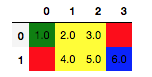
pipe调用中应用于通用 styler。>>> def some_highlights(styler, min_color="red", max_color="blue"): ... styler.highlight_min(color=min_color, axis=None) ... styler.highlight_max(color=max_color, axis=None) ... styler.highlight_null() ... return styler >>> df = pd.DataFrame([[1, 2, 3, pd.NA], [pd.NA, 4, 5, 6]], dtype="Int64") >>> df.style.pipe(some_highlights, min_color="green")

由于该方法返回一个
Styler对象,因此可以像直接应用底层高亮器一样对其进行链式调用。>>> (df.style.format("{:.1f}") ... .pipe(some_highlights, min_color="green") ... .highlight_between(left=2, right=5))
高级用法
有时可能需要预先定义样式函数,但在这些函数依赖于 styler、数据或上下文的情况下。由于
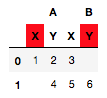
Styler.use和Styler.export被设计为与数据无关,因此不能用于此目的。此外,Styler.apply和Styler.format等方法不具备上下文感知能力,因此解决方案是使用pipe来动态包装此功能。假设我们想编写一个通用的样式函数来高亮显示 MultiIndex 的最后一个级别。索引的级别数是动态的,因此我们需要
Styler上下文来定义级别。>>> def highlight_last_level(styler): ... return styler.apply_index( ... lambda v: "background-color: pink; color: yellow", axis="columns", ... level=styler.columns.nlevels-1 ... ) >>> df.columns = pd.MultiIndex.from_product([["A", "B"], ["X", "Y"]]) >>> df.style.pipe(highlight_last_level)
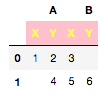
此外,假设我们想高亮显示一个列标题,如果该列中有任何缺失数据。在这种情况下,我们需要数据对象本身来确定对列标题的影响。
>>> def highlight_header_missing(styler, level):
...     def dynamic_highlight(s):
...         return np.where(
...             styler.data.isna().any(), "background-color: red;", ""
...         )
...     return styler.apply_index(dynamic_highlight, axis=1, level=level)
>>> df.style.pipe(highlight_header_missing, level=1)