pandas.io.formats.style.Styler.apply_index#
- Styler.apply_index(func, axis=0, level=None, **kwargs)[源代码]#
按级别将 CSS 样式函数应用于索引或列标题。
使用应用结果更新 HTML 表示。
在 1.4.0 版本加入.
在 2.1.0 版本加入: Styler.applymap_index 已弃用并重命名为 Styler.map_index。
- Parameters:
- funcfunction
func应该接受一个 Series 并返回一个相同长度的字符串数组。- axis{0, 1, “index”, “columns”}
要应用函数的标头。
- levelint, str, list, optional
如果索引是 MultiIndex,则是在其上应用函数的级别。
- **kwargsdict
传递给
func。
- Returns:
- Styler
参见
Styler.map_index逐个元素地将 CSS 样式函数应用于标头。
Styler.apply按列、按行或按表应用 CSS 样式函数。
Styler.map逐元素应用 CSS 样式函数。
Notes
func的每个输入都将是索引(如果它是 Index)或 MultiIndex 的一个级别。func的输出应该是 CSS 样式字符串的相同大小数组,格式为 ‘attribute: value; attribute2: value2; …’,或者,如果没有要应用于该元素的样式,则为空字符串或None。Examples
条件性突出显示索引中值的基本用法。
>>> df = pd.DataFrame([[1,2], [3,4]], index=["A", "B"])
>>> def color_b(s):
...     return np.where(s == "B", "background-color: yellow;", "")
>>> df.style.apply_index(color_b)

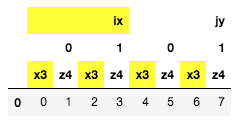
选择性地应用于 MultiIndex 列的特定级别。
>>> midx = pd.MultiIndex.from_product([['ix', 'jy'], [0, 1], ['x3', 'z4']])
>>> df = pd.DataFrame([np.arange(8)], columns=midx)
>>> def highlight_x(s):
...     return ["background-color: yellow;" if "x" in v else "" for v in s]
>>> df.style.apply_index(highlight_x, axis="columns", level=[0, 2])
...